We’ve been meeting a ton of groups and individuals who are starting out spending tons of cash on gear they really don’t need (yet) in our opinion. So we’d figure we’d post our takes on paranormal investigation basics:
Always carry I.D.
Get Permission to investigate the property & check out the property in daylight for safety issues!
Audio Recorder – To record E.V.P. Sessions and of course document other possible anomalous noises.
Camera (video or still) – To take pictures or video to capture hopefully some unexplained activity.
Batteries – Just in case the ones are drained or malfunction, you won’t miss a moment of the case!
First Aid Kit – Never hurts to be safe!
Flashlight(s) – Again safety First!
Notepad & Pen – All else fails take them along and write down the times and occurrences as they happen. Simpler way to start before you spend some money on more advanced gear.
A low cost recorder, available at most retailers like Wal-Mart. Connects to a computer by a USB port that pops out on a switch. Records in .wav format in HQ Mode. Has 4 file folder options to separate cases if needed.
Pro’s:
Flip out USB function for easy computer uploading of files, has a lock button to stop accidental recording or stopping of a recording.
Con’s:
Can’t use headphones to listen as you record as you can in higher end recorders.
Sony ICD-P210
An older audio recorder that connects to a computer by a USB cord. Sony software is required to download files to a computer. Has 4 file folder options to separate cases if needed. “Sony Quality”
Pro’s:
Solid recorder for E.V.P. work or general investigations, Can use headphones to listen as you record.
Con’s:
Limited Recording availability in HQ mode, Older Technology, Program required to Install to download audio files. Only works with Windows XP and lower without technical help.
Sony ICD-P620
A recorder that connects to a computer by a USB cord. Sony software is required to download files to a computer. Has 4 file folder options to separate cases if needed. “Sony Quality”.
Pro’s:
Solid recorder for E.V.P. work or general investigations, Can use headphones to listen as you record, Can record many of hours of Audio in HQ.
Con’s:
Program required to Install to download audio files.
Olympus VN-3100PC
A low cost recorder that connects to a computer by a USB cord. Software is required to download files to a computer. Has 4 file folder options to separate cases if needed.
Pro’s:
Solid recorder for E.V.P. work or general investigations.
Con’s:
Program required to Install to download audio files, Can’t use headphones to listen as you record.
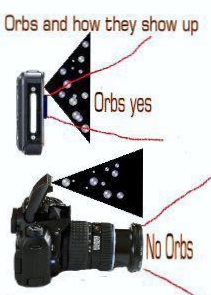
[youtube=http://youtu.be/BFmedqkWEsg] Orbs….We don’t think another word draws up as much debate in the paranormal world as this one. It is the most common type of evidence people use as claims of paranormal activity and is often used by groups to “prove a haunting”. They are believed by new groups, experienced groups and people who are capturing them, aka, non-ghost hunters, to be spirits caught on video or in pictures. Another popular belief is that an orb, is a ball of energy, a spirit’s energy form that is free floating. We have also heard of orbs being spirits or spirit guides, demons, astral creatures and of course just energy, like ball lightning, since energy is neither created nor destroyed. In reality, there is no proof or scientific back up for any of this, well except energy is neither created nor destroyed part.
We have now talked about the most common beliefs are so let us proceed into the truth. What orbs “REALLY” are. Orbs have been scientifically debunked as a modern creation with no prior examples to the availability of CCD lens (digital camera) technology (have you seen orbs in pictures predating digital cameras? Think about that for a minute, then read on…) and it’s inferior ability to focus (this is especially true of cell phone cameras which cannot in any way compare to professional grade or even consumer grade cameras readily available), they are the predominant form of paranormal images on the Internet.
Do digital or film Cameras Capture orbs the most often? Orbs are most commonly gained using digital cameras with built-in flash though not always. While many photographers with archives of photos report having occasionally seen “orbs” in their photos gained with film cameras, no solid evidence has been presented that this is not a modern light artifact error arising in the use of CCD lenses both in standard off the shelf cameras, cell phone cameras and the recent rise in reports of orb photos may be directly related to the common availability of digital cameras. It should be also noted that size of the camera is another consideration in the recent infestation of orb photos. As both film and digital cameras have steadily shrunk in size, reports of “orbs” increased as well. As cameras became smaller, the distance between the lens and the built-in flash also shrank, decreasing the angle of reflection back into the lens causing less focus on small light artifacts and thus an orb appears. A flash does not need to be present any light source that reflects or refracts from dust, moisture, etc in the air (it’s there moving with the air currents) and that enters the cameras lens (which it does otherwise you wouldn’t have a picture in the first place) can cause an orb artifact to appear.
Causes of Orbs: Solid orbs – Dust, pollen, insects, etc. Liquid orbs – Water, e.g. rain. Foreign material on the camera lens like a finger print. Foreign material within the camera lens Foreign material within the camera body, like again dust/moisture. There are also orbs showing up without any “environmental” explanation i.e. no visible dust, rain, moisture, snowing, or light reflections, etc. It should be noted that these particles or moisture are small, and are present in our environment at all times undetectable to the naked eye, but always moving.
They simply follow the air currents. 99.9% of orbs that move in “intelligent” ways are insects, such as small gnats. ” Ok. so what about the I see a face int hem people? They are simply seeing a natural activity called “matrixing”, which is the human mind’s tendency to find familiar images in complex shapes, patterns or colors.
“Now on the end on this I’ll tack on that I don’t believe orbs are anything more then dust, moisture, energy, etc, definitely not spirits. But I have seen a ball of light with my own eyes that was not a reflection. SO what does that mean? IDK, but that’s why we do what we do… we explore the unknown for answers. So their you have it ORBS – the fact, the myth, the debate rages on.” – Cedric
From a cyber shot manual, effectively telling you that orbs are normal dust, pollen, etc…
We’ve seen a lot of people trying to do E.V.P. sessions, and most of them do a poor job. So let’s take a look at how to properly execute and review an EVP session.
First off lets start with the audio recorder. A decent digital audio recorder can be bought at any electronics or mart for around $35 or so the more expensive ones work just as good as the cheap ones usually. Try to avoid the old cassette recorders, we say this because simply digital has no tapes to buy and simplicity of playing back/saving of audio clips/file. We use RCA & Sony models and they haven’t failed us yet. If it uses a proprietary file type, they usually have an audio program that installs itself into your computer the first time you plug it in allows you to convert the files over to .wav or .mp3 format.
Okay so you’ve got your digital recorder(s), you’ve got your supposedly haunted location… what do you do now? We introduce ourselves and ask simple questions like “Is there anyone here that would like to speak with us?”. Allow about 10-15 seconds for a clean response. Avoid moving around or moving the recorder while you’re waiting. It gets boring but it’ll save your ears from a terrible scratching sound during review. Try for yes or no questions, or questions that only need short answers. A good very short list of questions to ask, but not the only ones are:
How many people are here?
What’s your name?
What year is it?
Why are you still here?
Do you want us here?
Do you have a message for anyone?
You to have to try and remember that you’re talking to former-people. They can lie, they are fallible, and they might not always know the answer or they might just plain not want to talk. Most more of them are willing to talk then not.
So it’s getting late and it’s time for you to head back home. So what do you need to review your recorded audio you may ask? Headphones, noise cancelling are preferred, and are a given for audio review. As far as a computer program goes, we’d suggest Audacity. It has several filters and it’s about as user-friendly as programs come. Audacity also allows you to easily separate sections and loop them and its Free!
Audio file? Check. Headphones? Check. Computer, Audacity? Check check check. So let’s listen to what you’ve recorded. You’re listening to anything out of the ordinary, such as extra voices, heavy breathing, sighs, or anything generally odd. If you do find something you need to listen to it carefully, listen to the it atleast 10 seconds before and after this sound for any possibly explanations. If possible go back to the location and try to replicate the sound. Only after you’ve exhausted any possible explanation should you begin to consider that it’s paranormal.